Seamless Face Swapping
Replace one face while keeping the target photo as the visual anchor for pose, hairstyle, lighting, clothing, and background.
 GIF Face Swap
Make a GIF
Video to GIFImages to GIFMP4 to GIFConvert a GIF
GIF to MP4GIF to WebPGIF to WebMEdit & inspect
GIF CompressorGIF AnalyzerTutorials & Guides
How to Face SwapHow to Face Swap a GIFHead Swap IdeasArticles & Comparisons
BlogFree GIF Face Swap ComparisonGoogle Face Swap GuideHelp & Answers
Face Swap FAQHelp & SupportReplace one face in a still image while keeping the target pose, hairstyle, lighting, and background. The functional image face swap workspace starts below.
Photo Face Swap workspace
1 credit · private processing · target hair preserved
Six practical capabilities help you prepare the inputs, understand what should stay unchanged, and review the finished image responsibly.
Replace one face while keeping the target photo as the visual anchor for pose, hairstyle, lighting, clothing, and background.
Upload the target and source images, follow the generation status, then inspect the completed result at full size before downloading.
Use the four-point angle, visibility, resolution, and result-review checklist before spending a credit or sharing an edit.
Create personalized portraits, themed character edits, and meme images when the target photo contains one clear main face.
Inputs and saved results use private storage and short-lived signed links. Only upload images and faces you are authorized to use.
A focused two-image workflow, clear format guidance, and visible validation help first-time users prepare a better source portrait.
Real API case · public-domain inputs
This is a real provider output, not a mockup. Charlie Chaplin remains the target composition; the source portrait supplies the replacement identity.
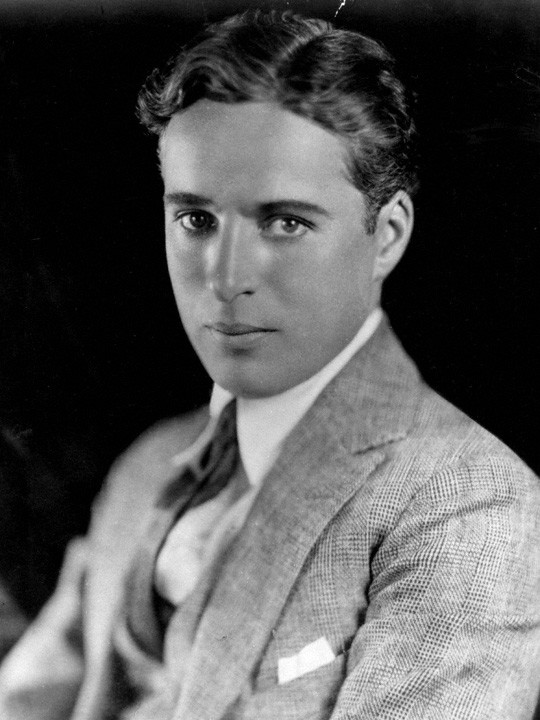
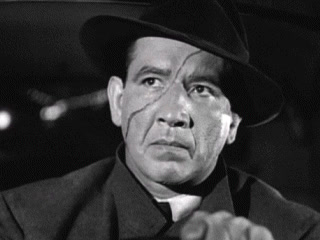
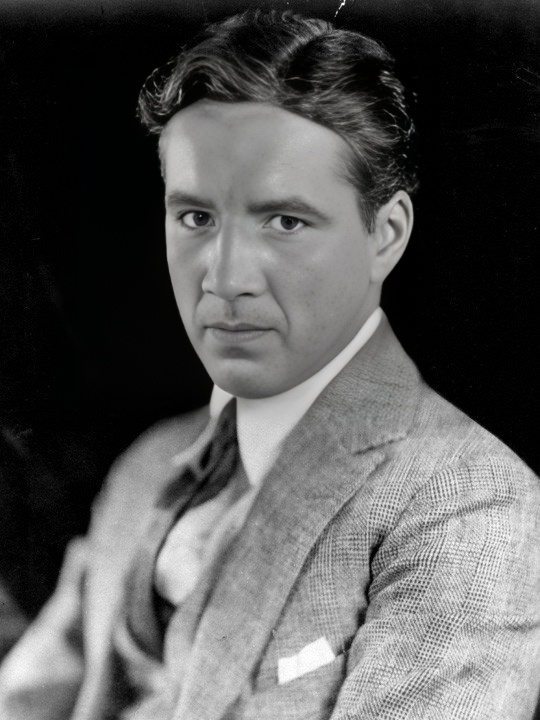
Portrait sources and licensing are documented in the local demo attribution file. Results vary with pose, lighting, occlusion, and source resolution.
Facial identity and related facial detail inside the detected face region.
Target pose, framing, clothing, background, overall lighting, and usually the hairstyle.
Hairline, glasses, teeth, extreme angles, and hard shadows can still show artifacts.
How it works
This image keeps the pose, composition, clothing, hair, lighting, and background.
Use one clear portrait with visible eyes and a similar head angle.
The enhanced model returns a real image for full-size review and download.
Input quality lab
A clean source portrait matters more than adding more instructions after generation.
Keep the source and target head direction reasonably close.
Avoid sunglasses, hands, hair, or hard shadows across the source face.
Use a source face large enough to see the eyes, nose, mouth, and jaw clearly.
Inspect eyes, teeth, skin edges, and hairline at full size before sharing.
Keep a composed portrait while testing an authorized identity change.
Place a consenting face into a themed image without rebuilding the whole scene.
Change the recognizable face while retaining the crop, caption space, and punchline.
A successful request is not automatically a publish-ready image.
Only upload faces you are authorized to use. Do not create deceptive or harmful edits.
Inputs and saved results use private buckets and short-lived signed access links.
Files follow the site's generation retention policy and are not presented as a public gallery.
1 credit
Per signed-in photo face swap
JPG · PNG · WebP
Accepted target and source formats
One target face
Use Multiple Face Swap for a group
Continue the workflow
Questions before you start
Clear constraints help you choose the right source photos and know what to inspect in the result.