01 · Overview
About the Facepalm Meme template
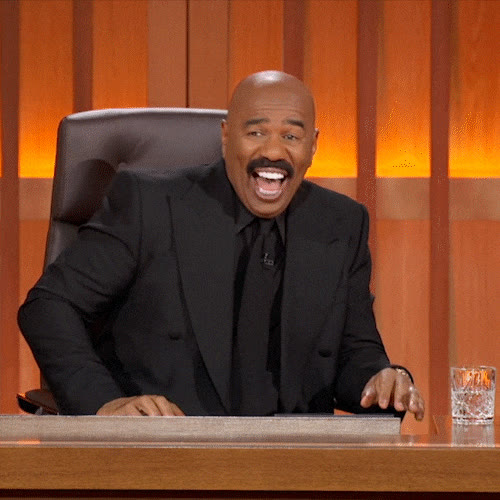
Facepalm Meme is a ready-to-use meme reaction selected around one visually dominant subject. It communicates secondhand embarrassment, with the hand gesture completing the joke. The loop begins with enough facial information for recognition and then moves into the familiar facepalm, so it reads as a complete reaction rather than a still pose. Instead of asking you to locate, download, and prepare the source animation, this page loads the target GIF directly into the face-swap workspace. You can focus on choosing a suitable portrait, checking the preview, and deciding whether the result fits the message you want to send.
One adult subject remains dominant while a hand moves across the face near the end of the action. That visual structure matters because an animated face swap must follow changing expressions, head position, and lighting across many frames—not just place a face on one still image. This template is useful because its performance is easy for a viewer to understand at a glance, while its known motion and composition give you specific details to inspect before you use the final GIF.
02 · The reaction
What this template does
This loop turns facepalm meme GIF face swap into a direct visual reply. Its defining motion is short one-person reaction with a quick hand-to-face gesture. The action carries the emotional meaning before a viewer reads supporting text, while the fixed source scene keeps the result recognizable as an edited reaction. Use it when the tone described by embarrassed, disappointed, awkward, exasperated matches the situation; choose another template when the message calls for a quieter or substantially different emotion.
Face structure
One dominant adult face is visible before the facepalm motion begins
Movement
Short one-person reaction with a quick hand-to-face gesture
Message
Meme replies, awkward moments, and playful group-chat reactions
03 · Audience
Who it’s for
meme makers responding to harmless mistakes. They can use the Facepalm Meme loop when a plain emoji cannot carry secondhand embarrassment, with the hand gesture completing the joke.
friends acknowledging an awkward group-chat moment. For this audience, the value is the recognizable emotional structure and the ability to make it feel personally relevant without rebuilding the animation.
creators illustrating a relatable personal fail. The short format is easy to test in a conversation, caption, or social reply before it becomes part of a larger content idea.
04 · Scenarios
Best use cases
reacting to an avoidable typo or mistake. The embarrassed tone is already visible in the performance, so a short line of context is usually enough.
answering a joke that is intentionally terrible. Use it where the audience can clearly understand that the result is an edited reaction rather than documentary footage.
showing secondhand embarrassment during a story. The awkward tone is already visible in the performance, so a short line of context is usually enough.
turning your own minor failure into a self-aware reaction. Use it where the audience can clearly understand that the result is an edited reaction rather than documentary footage.
Compare more reactions in the template library, or read the GIF face-swap tutorial.
05 · Workflow
How to use this template
- 1
Choose one suitable portrait
Use a sharp image containing one face. Keep the forehead, eyes, cheeks, mouth, and chin visible. A portrait with lighting and head direction similar to the Facepalm Meme source gives the animation a more consistent identity reference.
- 2
Confirm the preloaded target
The Facepalm Meme GIF is already in the workspace above. Check the animated preview and file name. If its motion or emotional tone does not match your idea, replace it with another supported GIF or WebP before starting.
- 3
Start, inspect, and share responsibly
Continue with Start face swap, then review the complete loop rather than only its first frame. Look closely at fast expressions, head turns, the jawline, and any overlap described in the limitations below. Download or share only when the edit is clear, appropriate, and used with permission.
06 · Template fit
Why this GIF works for face swapping
Animated face swapping is easier to evaluate when a clip has one dominant subject, readable facial features, and a continuous performance. This template was selected around those practical qualities rather than popularity alone. One dominant adult face is visible before the facepalm motion begins. The source still contains motion and expression changes, so selection reduces avoidable complexity without removing the need for a full preview.
Short one-person reaction with a quick hand-to-face gesture. That gives the system a consistent visual target across the loop and gives you clear checkpoints for quality: alignment around the eyes, continuity at the jaw, and a believable transition through the strongest expression. The surrounding body, gesture, lighting, and background stay part of the original animation, which is why the result should be judged as a complete edited scene.
The main limitations are also specific. The moving hand temporarily occludes facial features, so those frames may look less consistent than the unobstructed opening. This is a face replacement, not hand tracking; fingers and gesture remain exactly as in the source. These are reasons to review carefully, not guarantees that the template will fail. A different portrait—especially one with a closer angle, cleaner lighting, or more visible facial detail—can change the outcome substantially.
07 · Quality
Best-result checklist
use a portrait with the full forehead and jaw visible. The uploaded face is the identity reference for every frame, so clarity at the start affects the full loop.
judge the result before the hand covers the face and during the overlap. A closer angle match reduces the amount of interpretation needed when the source head moves.
prefer even lighting across both cheeks. Pause on the most difficult frame instead of judging only the attractive opening thumbnail.
keep the caption focused on the situation rather than a person’s appearance. If a boundary or expression looks inconsistent, replacing the portrait is often more useful than forcing the same input.
08 · Troubleshooting
What to avoid
expecting the model to redraw the moving hand. Missing facial information gives the system less reliable material to carry through the animation.
a portrait already covered by a hand. The template preserves the original performance and scene, so it cannot correct every mismatch outside the face.
using the facepalm to shame a private person without permission. Consent, context, and an honest presentation matter more than making a reaction look maximally convincing.
09 · Discovery
Tags, emotions, topics, and aliases
- Emotions
- embarrasseddisappointedawkwardexasperated
- Topics
- mistakesbad jokesawkward momentsself-deprecation
- Tags
- facepalmfail reactionembarrassed memedisappointed GIF
- Also called
- face palm reactionawkward fail GIFhand on face meme
10 · Responsible use
Safety, consent, and usage notes
Use a portrait you own or have clear permission to edit. A reaction GIF can feel casual, but placing another person’s identity into a recognizable scene may create confusion or embarrassment when the context is missing. Do not use the result for deception, harassment, non-consensual sexual content, fraud, or a false endorsement.
Keep the edit framed as a meme or creative reaction. Do not claim that the person in the uploaded portrait performed the original gesture, appeared in the source production, or made a statement shown in your caption. Consider labeling the media as edited when a reasonable viewer could mistake it for authentic footage.
11 · Questions
Facepalm Meme FAQ
How do I use the Facepalm Meme template?+
The target GIF is already loaded in the workspace on this page. Upload one clear portrait, review the selected files, and choose Start face swap to continue. You can replace the target animation before starting if you decide this reaction is not the right fit.
What portrait works best for this meme GIF?+
Use one sharp, unobstructed face with even lighting and a head angle close to the source subject. For this specific template, an unobstructed source portrait gives the model the clearest identity reference before the source hand crosses the face. Avoid group photos, strong blur, sunglasses, and tight crops that remove the chin or forehead.
What should I inspect in the Facepalm Meme preview?+
Watch the entire loop and pause near its strongest movement. Check the eyes, mouth, jaw, hairline, and any passing hand or graphic overlay. The moving hand temporarily occludes facial features, so those frames may look less consistent than the unobstructed opening. A convincing first frame is not enough if later frames drift or become distracting.
Can I use a different GIF instead of this template?+
Yes. The template is a convenient preset, not a locked file. Replace the target with your own supported GIF or WebP in the upload area, then confirm that your alternative has one clear subject, manageable motion, and enough facial detail to review.
What are the consent and sharing rules for an edited reaction GIF?+
Use a face you own or have permission to use, and do not present the edit as authentic evidence, an endorsement, or a real statement by another person. Consider the audience and caption before sharing, especially when the result could embarrass, deceive, or target someone.